A socket is one endpoint of a two-way
communication link between two programs running on the network. The application
creates a socket. Socket is an interface between application layer and
transport layer.
It is an interface (a “door”) into which an
application process can both send and receive message to/from another
application process (remote/local application process). Socket is also referred
as the application programmer’s interface (API) between the application and the
network.
Need of Socket
When we desire a communication between two
applications possibly running on different machines, we need sockets. Requirement
of socket is to build any Network Application i.e., Web browsers, FTP etc…
How Socket Works?
There are two different programs running on
two different machines in network. Client program wants to communicate with
server program. Client select any free port from client machine and send data
to server process. Server select port which is bind with particular server
process. That port is called agreed or specific port. After that logical
connection is created between client and server. Server received client process
at agreed/specific port. Then communication is started between server and
client.
What is Socket address?
Socket is combination of IP address and Port
number. IP address is used for host-to-host communication in network. IP
address is assigned by network layer. Port number is used for process-to-process
communication in network. Port number is assigned by transport layers protocol.
How process can identify using socket?
Let’s take one example, there is one Server
host and Client host in above diagram. There are two different servers are
configured on server host. Client send a request message to server. Request
message is received from port number 80. At server-side Web server is bind with
port number 80. So, Sever OS forward that request message to Web server. Process
is identify based on port address. Port address is already assigned in unique
socket address.
On which layer socket is execute in TCP/IP
Model?
Socket is executed at transport layer in TCP/IP
as well as in OSI model. Socket address is combination of IP address and port
number. Port number is assigned by transport layer protocol either TCP or UDP.
Port address is used for process-to-process communication in network.
Types of Sockets
There are two types of sockets: Stream
Socket and Datagram Socket.
Stream Socket
Stream socket is also called connection-
oriented socket. It provides reliable, connected networking service. Error
free; no out- of- order packets (uses TCP). Applications of Stream Sockets are
telnet/SSH, http, https and many more.
Datagram Socket
Datagram socket is also known as
Connectionless socket. It provides unreliable, best- effort networking service Packets
may be lost; may arrive out of order (uses UDP). Application of Datagram
Sockets are streaming audio/ video (real player) and many more.
Raw Socket, Sequenced packet Socket etc.
To learn more about Introduction of Socket, Click here
The HTTP CONNECT method starts
two-way communications with the requested resource. It can be used to
open a tunnel.
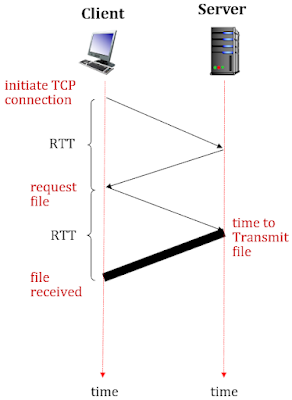
There are two types of HTTP Connection: Non-Persistent HTTPand Persistent HTTP. Let’s discuss HTTP response time and RTT
(round trip time). Below figure shows the HTTP response time and RTT.
Figure: HTTP Connection
RTT (round-trip time): A time for a small
packet to travel from client to server and server to client.
HTTP response time: 1-RTT to initiate TCP connection, 1-RTT for
HTTP request-response and File transmission time.
HTTP Response Time = No. of RTT + file
transmit time
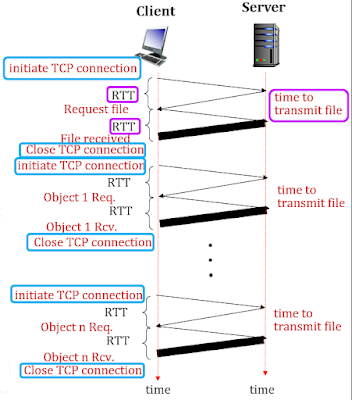
Non-persistent HTTP
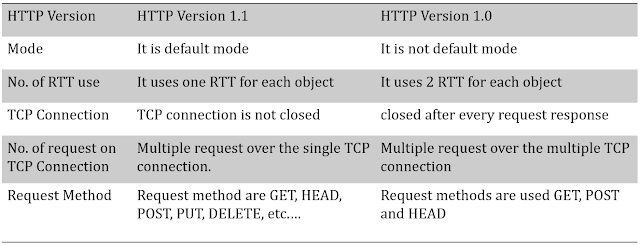
Non-persistent connections are the default mode
for HTTP/1.0. A non-persistent connection is closed after the server sends the
requested object to the client. The connection is used exactly for one request
and one response. For downloading multiple objects, it required multiple
connections.
Non-Persistent HTTP = 2 RTT + 1 file-transmit
time
Figure: Non-Persistent HTTP Connection
Example: Transferring a
webpage from server to client, webpage consists of a base HTML file and 10 JPEG
images. Total 11 object are resided on server.
11 objects = 22 RTT + 11 file-transmit time
Persistent HTTP
HTTP 1.1 made persistent connections the
default mode. The server now keeps the TCP connection open for a certain period
of time after sending a response. This enables the client to make multiple
requests over the same TCP.
There are two types of Persistent HTTP
Connection: Persistent HTTP without pipelining and Persistent HTTP with
pipelining.
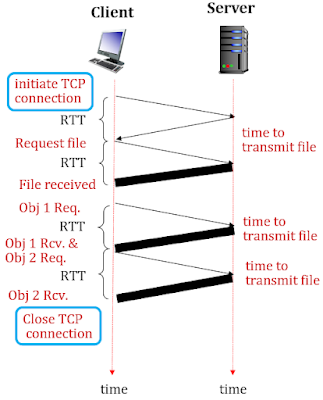
Persistent HTTP without pipelining
The client issues a new request only when the
previous response has been received. The client experiences one RTT in order to
request and receive each of the referenced objects. TCP connection is idle.
i.e., does nothing while it waits for another request to arrive. This idle
situation wastes server resources.
Figure: Persistent HTTP Connection without pipelining
In above figure, new object request sends
after receive previous object.
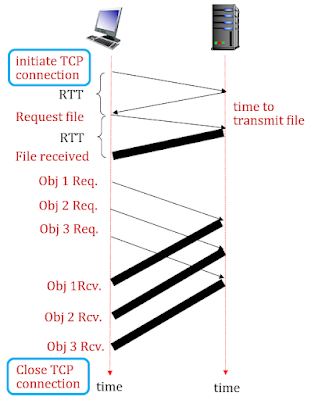
Persistent HTTP with Pipelining
Default mode of HTTP 1.1 uses persistent
connections with pipelining. Client issues a request as soon as it encounter a reference.
The HTTP client can make back-to-back requests for the referenced objects. It
can make a new request before the back-to-back requests; it sends the objects
back-to-back. Pipelined TCP connection remains idle for a smaller fraction of
time.
Figure: Persistent HTTP Connection with pipelining
In above figure, new object request sends
receive previous object, but all the objects are received in a sequence because
this method uses pipelining concepts.
Persistent HTTP Vs Non-Persistent HTTP
To learn more about Persistent HTTP vs Non-Persistent HTTP, Click here
HTTP is a
standard web transfer protocol for fetching resources like HTML documents,
images, videos. HTTP stands for Hyper Text Transfer Protocol. HTTP
is an application layer protocol. HTTP is standard. HTTP uses port no 80. HTTP
is a client-server protocol. HTTP behaviour is request-response.
Connection:The client makes a
connection to the server.
Request:The client requests
information from the server.
Response:The server either provides
the information to the client or refuses to provide the information.
Close:Either or both parties terminate
the transaction.
Let us discuss
all the components of HTTP Transaction one by one in this post.
Figure: Components of HTTP Transaction
Connection
The first
part of an HTTP transaction is the connection. The translation of the name
address into IP address is done by DNS. The client program connects to the
server by a TCP connection at the address specified in the URL. Example:
http://www.facebook.com
Request
There are
two different types of requests: Simple Request, Full Request
A simple
request is just a single GET line naming the page desired, without the protocol
version. The response is just the raw page with no headers, no MIME, and no
encoding.
Full
request is indicated by the presence of the protocol version on the GET request
line. The first word on the full request line is simply the name of the method
to be executed on the web page. Full request contains the command, the page
desired, and the protocol/version. The names are case sensitive, so, GET is a
valid method but get is invalid.
Request Line
Below
figure shows the format of request message.
Figure: Format of Request message
Request
line contains following things: Request type, Resources, HTTP version. Example
of request line is as below:
Request
type: It categorizes the request message into several methods for
HTTP version 1.1. i.e., GET, POST, DELETE, PUT, COPY, MOVE, LINK, UNLINK
Resource: URL is
used access information from internet. The URL defines four things 1. Method 2.
Host 3. Port 4. Path.
Example, Protocol://Host:Port/Path
⇒ http://192.168.1.1:80/home.html
HTTP
Version:HTTP Version 1.1 is used here
because of full request.
Realtime example of http request message
Response
Below
figure shows the format of response message.
Figure: Format of Response Message
The
status line is the first line in the response message. It consists of three items: The HTTP version number,
showing the HTTP specification to which, the server has tried to make the
message comply. A status code, which is a three-digit number indicating the
result of the request.
Example
of status line is as below,
HTTP
Version:HTTP Version 1.1 is used here
because of full request.
Status
Code & Phrase: There are some of the status codes meaning:
200 OK: Request succeeded.
301 Moved Permanently: Requested object moved.
400 Bad Request: Request message not understood by server.
404 Not Found: Requested document not found on this server.
505 HTTP Version Not Supported: Requested http version not
support.
Realtime example of http response message
Close
After the client and server have exchanged
information by sending requests and responses, both parties may end the
transaction by closing the connection. This is done by terminating the TCP
connection (usually to port 80) that was set up in the connection stage.
Header can be one or more header lines. Each
header line is made of a header name, a colon, a space and a header value. The
header exchange additional information between the client and the server. Below
figure shows the HTTP header structure.
Figure: HTTP Header Structure
A four different header are used: general
header, response header (in response message), entity header, request header
(in request message). Below figure shows the difference between response and
request header.
Figure: Format of Request and Response message
General header: General header includes general information
about the message. Request and a response both contains general header.
Response header: Response header can be present only in a
response message. It specifies the server’s configuration and special
information about the request.
Request header: Request header can be present only in a
request message. It specifies the client’s configuration and the client preferred
document format.
Entity header: Entity header gives information about the
body of the document. It is mostly present in response messages, some request
message, such as POST and PUT methods, that contain a body also use this type
of header.
Realtime example of http header
Date: It indicates the time and date when the HTTP response was created and
sent by the server.
Server: It indicates the message was generated by an Apache Web server.
Last-Modified: It indicates the time and date when the
object was created or last modified.
Content-Length: It indicates the number of bytes in the
object being sent.
Content-Type: It indicates object in the entity body is
HTML text.
The HTTP CONNECT method starts
two-way communications with the requested resource. It can be used to
open a tunnel.
There are two types of HTTP Connection: Non-Persistent HTTPand Persistent HTTP. Let’s discuss HTTP response time and RTT (round
trip time). Below figure shows the HTTP response time and RTT.
Figure: HTTP Connection
RTT (round-trip time): A time for a small
packet to travel from client to server and server to client.
HTTP response time: 1-RTT to initiate TCP connection, 1-RTT for
HTTP request-response and File transmission time.
HTTP Response Time = No. of RTT + file
transmit time
Non-persistent HTTP
Non-persistent connections are the default
mode for HTTP/1.0. A non-persistent connection is closed after the server sends
the requested object to the client. The connection is used exactly for one
request and one response. For downloading multiple objects, it required
multiple connections.
Non-Persistent HTTP = 2 RTT + 1 file-transmit
time
Figure: Non-persistent HTTP Connection
Example: Transferring a
webpage from server to client, webpage consists of a base HTML file and 10 JPEG
images. Total 11 object are resided on server.
11 objects = 22 RTT + 11 file-transmit time
Persistent HTTP
HTTP 1.1 made persistent connections the
default mode. The server now keeps the TCP connection open for a certain period
of time after sending a response. This enables the client to make multiple
requests over the same TCP.
There are two types of Persistent HTTP
Connection: Persistent HTTP without pipelining and Persistent HTTP with
pipelining.
Persistent HTTP without pipelining
The client issues a new request only when the
previous response has been received. The client experiences one RTT in order to
request and receive each of the referenced objects. TCP connection is idle.
i.e., does nothing while it waits for another request to arrive. This idle
situation wastes server resources.
Figure: Persistent HTTP Connection without pipelining
In above figure, new object request sends after
receive previous object.
Persistent HTTP with Pipelining
Default mode of HTTP 1.1 uses persistent
connections with pipelining. Client issues a request as soon as it encounter a reference.
The HTTP client can make back-to-back requests for the referenced objects. It
can make a new request before the back-to-back requests; it sends the objects
back-to-back. Pipelined TCP connection remains idle for a smaller fraction of
time.
Figure: Persistent HTTP Connection with pipelining
In above figure, new object request sends receive
previous object, but all the objects are received in a sequence because this
method uses pipelining concepts.
Persistent HTTP Vs Non-Persistent HTTP - Click here for video
It is a
process of moving a data packet from source to destination across one or more
network. In routing, the data packet choosing optimal path from one network to
another. The main function of the network layer is to route packets from source
to destination. Routing is performed on network layer device called as a router.
A host or
router has a routing table with an entry for each destination, or a
combination of destinations, to route IP packets. Routing table can be either
static or dynamic. A static routing table contains information entered manually.
The administrator enters the route for each destination into the table. Dynamic
routing table is updated periodically by using one of the dynamic
routing protocols such as RIP, OSPF or BGP.
If there
will be any changes in internet or in topologies, manual entries can be done in
static table by administrator. Dynamic table is updated automatically when
there is a change somewhere in the internet or changes in any topologies. Now a
day, dynamic table is used because of sudden changes in the internet. For
example, one of the routers in the internet may fail or link between any two
routers is down. So, because of these reasons dynamic table is required.
How route
will be selected in network from source to destination?
To
accomplish a route through the network must be selected generally more than one
route is possible. The selection of route is generally based on some
performance criteria. The simplest criteria are to choose shortest route
through the network. The shortest route means that passes through the least
number of nodes. This shortest route selection results in least number of hops
per packet. A routing algorithm is designed to perform this task. The routing
algorithm is a part of network layer software.
Classification of Routing Protocol
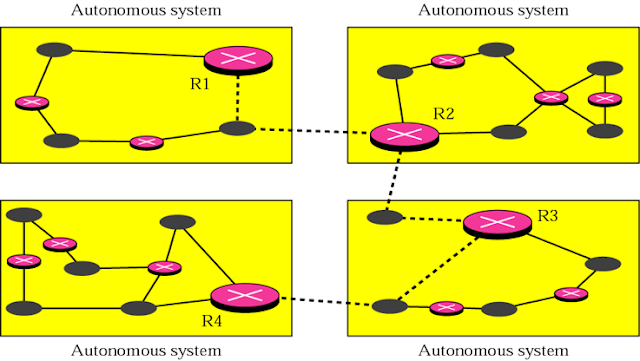
An
internet is divided into autonomous systems. An autonomous system is a group of
networks and routers under the authority of a single administration. Below
figure shows the autonomous system. Routing inside an autonomous system is
referred to as intra-domain routing. Routing between autonomous
system is referred to as inter-domain routing.
There may be
different intra-domain routing protocols working in different autonomous
system. Only one inter-domain routing protocol handles routing between
autonomous systems. Classification of unicast routing protocols are based on
intra domain and inter domain.
To learn more about classification of unicast routing protocols, Click here